Showing posts with label LAPTOP. Show all posts

Wednesday, March 28, 2012

how to show hibernate option in shutdown menu


how to enable hibernate option in shutdown menu in windows xp / windows 7

The mentioned process disables the hybrid sleep option.
follow the steps below :)
In the Control Panel Window, Click the Power Options icon
In the 'Change Settings For Plan' window, Click the 'Change advanced power settings'
Click the Plus (+) sign next to the Sleep option
click 'Allow hybrid sleep'. set it to 'Off'
Click the OK button
now you should see the hibernate option.

Friday, November 5, 2010

Built in Mic not working - Windows XP

Built in Mic isnt working DELL LAPTOP - Windows XP


- Right click My Computer
- Click on Properties
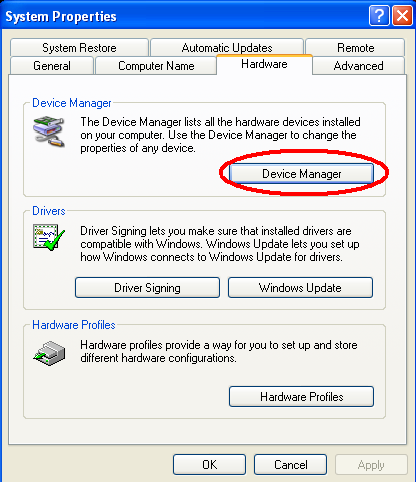
- Click on Hardware Tab
- Click on device manager
- Find your sigma tel sound driver in list
- Right click on your sound driver and click properties
- Click on unistall and click on OK button
- Click on Action menu in device manager window
- Click on scan for hardware changes
- Now again point your cursor to sound driver in the list
and install the driver
- It will start working ;-)


Step 01
 
Step 02

Step 03


Step 04

Step 05

Step 06


This is how built-in mic start working. Simple ;-)

Twitter Delicious Facebook Digg Stumbleupon Favorites More

 
Design by Free WordPress Themes | Bloggerized by Lasantha - Premium Blogger Themes | fantastic sams coupons